
10 Things to Check Before Buying a Refurbished Laptop Online
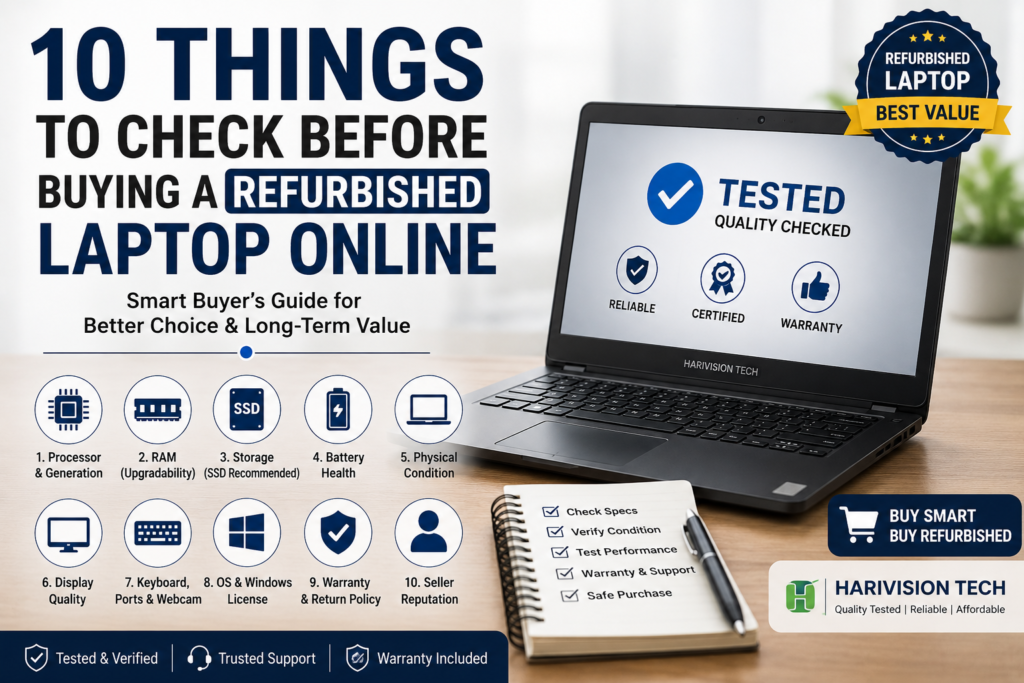
Buying a refurbished laptop online can be a smart way to get better specifications at a lower price. Instead of spending a large amount on a brand-new laptop, you may be able to purchase a professionally tested business laptop with a good processor, sufficient RAM and SSD storage within your budget.
However, not every refurbished laptop offers the same quality.
The condition, testing process, specifications, battery health, warranty and seller reliability can vary significantly. A laptop that looks affordable may not provide good value if it has an outdated processor, poor battery backup, a damaged display or no warranty support.
Before placing an order, you should understand what you are buying and check whether the laptop is suitable for your requirements.
In this refurbished laptop buying guide, we will explain the 10 most important things to check before buying a refurbished laptop online.
What Is a Refurbished Laptop?
A refurbished laptop is a previously owned, returned, open-box or business-used laptop that has been inspected, tested and prepared for resale.
Depending on the refurbishment process, the laptop may undergo checks such as:
- Processor and motherboard testing
- RAM health testing
- SSD or hard-disk health checking
- Display inspection
- Keyboard and touchpad testing
- Battery and charging tests
- Wi-Fi, Bluetooth and port testing
- Operating-system installation
- Physical cleaning
- Overall performance testing
Some components may also be repaired or replaced if required.
A properly tested refurbished laptop can provide reliable performance for office work, online classes, business applications, web browsing, programming and everyday use.
However, the term “refurbished” does not automatically guarantee quality. Buyers should always check the product specifications, condition, warranty and seller information before purchasing.
Refurbished Laptop vs Used Laptop: What Is the Difference?
Many buyers use the terms “refurbished laptop” and “used laptop” interchangeably, but they may not mean the same thing.
| Feature | Refurbished Laptop | Used Laptop |
|---|---|---|
| Previous ownership | Usually previously owned or used | Previously owned |
| Hardware testing | Generally tested before resale | May or may not be tested |
| Repairs or upgrades | Components may be repaired or upgraded | Usually sold in its existing condition |
| Operating system | May include a fresh installation | Depends on the seller |
| Warranty | Seller warranty may be available | Often sold without warranty |
| Quality checks | Usually inspected before sale | Depends on the individual seller |
A refurbished laptop may provide more buying confidence when the seller clearly mentions the testing process and warranty terms.
You can also compare available second-hand laptop models and market listings through the Nehru Place Market used laptop section before making a buying decision.
10 Things to Check Before Buying a Refurbished Laptop Online
1. Check the Processor Model and Generation
The processor is one of the most important components of a laptop. It affects overall speed, multitasking, software compatibility and long-term usability.
Do not check only whether the laptop has an Intel Core i3, Core i5 or Core i7 processor. You should also check its processor generation.
For example:
- Intel Core i5 3rd Generation
- Intel Core i5 6th Generation
- Intel Core i5 8th Generation
- Intel Core i5 10th Generation
A newer-generation Core i5 processor may provide better efficiency, features and software compatibility than a much older Core i5 processor.
The best processor depends on how you plan to use the laptop.
For basic home and office work
A Core i3 or Core i5 processor with sufficient RAM and SSD storage may be suitable for:
- Web browsing
- Microsoft Office
- Billing software
- Online meetings
- Basic accounting applications
For professional multitasking
Consider a newer-generation Core i5 or Core i7 processor for:
- Multiple browser tabs
- Advanced spreadsheets
- Business software
- Programming
- Light photo editing
- Regular multitasking
Before buying, search for the exact processor model rather than relying only on the “Core i5” or “Core i7” label.
For example, the Refurbished Dell Latitude 5400 Core i5 8th Gen Laptop includes an Intel Core i5 8th Generation processor, 8GB DDR4 RAM and 256GB SSD storage.
2. Check How Much RAM You Need
RAM affects how smoothly a laptop handles multiple applications at the same time.
The amount of RAM you need depends on your work.
4GB RAM
Suitable mainly for:
- Basic browsing
- Simple documents
- Light applications
However, 4GB may feel limited when running multiple browser tabs and modern applications together.
8GB RAM
A practical choice for many users, including:
- Office work
- Online classes
- Video meetings
- Web browsing
- Accounting software
- Everyday multitasking
16GB RAM
Recommended for users who need:
- Heavy multitasking
- Programming
- Large spreadsheets
- Photo editing
- Multiple professional applications
- More long-term flexibility
Also check whether the laptop’s RAM can be upgraded. Some laptops have replaceable RAM modules, while others may have memory soldered to the motherboard.
If you plan to upgrade later, check:
- Maximum supported RAM
- Number of RAM slots
- Existing RAM configuration
- RAM type: DDR3, DDR4 or DDR5
- Supported RAM speed
For compatible laptop memory upgrades, you can explore the Refurbished 16GB DDR4 Laptop RAM available from Harivision Tech.
3. Choose SSD Storage Instead of Only an HDD
Storage type has a major impact on laptop performance.
Older laptops often use traditional hard-disk drives. An HDD can provide affordable storage, but an SSD generally offers faster performance.
An SSD can improve:
- Windows startup time
- Application loading
- File access
- System responsiveness
- Multitasking experience
Common laptop storage options include:
- 128GB SSD
- 256GB SSD
- 512GB SSD
- 1TB SSD
For office work and normal daily use, a 256GB SSD may be sufficient if you do not store many large files.
For large documents, videos, software or multiple applications, a 512GB SSD or higher capacity may be more suitable.
Before buying, check whether the laptop uses:
- 2.5-inch SATA SSD
- M.2 SATA SSD
- M.2 NVMe SSD
These storage types are not always interchangeable. Compatibility depends on the laptop model and available storage slot.
You can read the Harivision Tech guide on SATA SSD compatibility with Dell Inspiron laptops to understand why checking the correct interface and form factor is important.
4. Check the Laptop’s Battery Health
Battery condition is one of the most important factors when buying a refurbished laptop.
Laptop batteries lose capacity over time. A refurbished laptop may not provide the same battery backup as a new laptop because battery performance depends on:
- Laptop age
- Previous usage
- Battery charge cycles
- Battery capacity
- Power settings
- Screen brightness
- Applications running in the background
Before buying, check whether the seller mentions:
- Estimated battery backup
- Battery testing
- Battery condition
- Battery replacement policy
- Whether battery performance is covered under warranty
Avoid expecting a fixed number of battery hours unless the seller provides clear testing conditions. Actual battery backup can vary according to usage.
If you mainly use the laptop at a desk, moderate battery backup may be acceptable. If you travel regularly or work away from a power source, battery condition should be a higher priority.
5. Inspect the Physical Condition Carefully
Refurbished laptops may have minor signs of previous use.
Small scratches, light marks or minor cosmetic wear may not affect performance. However, major physical damage can create long-term problems.
Check the product images and description for:
- Cracks on the body
- Broken hinges
- Loose display panel
- Missing screws
- Deep scratches
- Dents
- Damaged corners
- Broken keyboard keys
- Loose charging port
- Damaged USB ports
Pay special attention to the laptop hinges. Loose or damaged hinges may put pressure on the display frame and body.
Ask whether the product images show the actual laptop or are representative images. If cosmetic condition is important to you, request additional information before ordering.
6. Check the Display Quality
The laptop screen is one of the most expensive components to replace.
Before buying a refurbished laptop online, check:
- Screen size
- Display resolution
- Brightness
- Dead pixels
- Bright spots
- Dark patches
- Screen lines
- Colour quality
- Screen flickering
Common laptop screen sizes include:
- 12.5 inches
- 13.3 inches
- 14 inches
- 15.6 inches
A 14-inch laptop can be a good balance between portability and usability. A 15.6-inch laptop may provide a larger viewing area but can be heavier to carry.
Also check the display resolution.
Common resolutions include:
- HD: 1366 × 768
- Full HD: 1920 × 1080
A Full HD display generally provides more screen space and sharper visuals, but the best option depends on your budget and requirements.
7. Test the Keyboard, Touchpad, Webcam and Ports
Small hardware problems can affect everyday usability.
Before buying, check whether the following components have been tested:
Keyboard
Confirm that:
- All keys work
- No keys are missing
- Keys are not excessively loose
- Function keys operate correctly
Touchpad
Check:
- Cursor movement
- Left and right clicks
- Scrolling
- Multi-touch gestures, where supported
Webcam and microphone
These are important for:
- Online classes
- Video meetings
- Remote work
- Business calls
Connectivity ports
Check which ports are available:
- USB-A
- USB-C
- HDMI
- DisplayPort
- Ethernet/LAN
- Audio jack
- SD card reader
Do not assume that every laptop has all modern ports. Older business laptops may include useful legacy ports, while some newer thin laptops may have fewer connections.
Also confirm that Wi-Fi and Bluetooth are working correctly.
8. Check Windows Licence and Operating-System Compatibility
Before buying, check which operating system is installed and whether the laptop officially supports it.
Ask the seller:
- Which Windows version is installed?
- Is Windows activated?
- Is the licence genuine?
- Does the laptop support Windows 11?
- Are the required drivers installed?
According to Microsoft’s official Windows 11 specifications, minimum requirements include a compatible 64-bit processor, at least 4GB RAM, 64GB storage, UEFI Secure Boot capability and TPM 2.0.
However, meeting only the minimum RAM and storage requirements does not automatically confirm full compatibility. The exact processor model and security features should also be checked.
If Windows 11 compatibility is important, ask for confirmation before purchasing rather than assuming that every refurbished laptop supports it.
9. Check the Warranty and Return Policy
Warranty is one of the most important factors when buying a refurbished laptop online.
A very low price may not be a good deal if the laptop has no warranty or support.
Before placing an order, check:
- Warranty duration
- Repair or replacement policy
- Return eligibility
- Return period
- Technical support availability
- Parts covered under warranty
- Warranty exclusions
Also check whether the warranty covers:
- Motherboard
- RAM
- SSD
- Display
- Keyboard
- Charger
- Battery
Battery warranty may be different from the warranty offered on other laptop components because batteries are consumable parts.
Read the complete warranty and return terms instead of relying only on a “warranty included” label.
10. Buy from a Reliable Seller
The seller is as important as the laptop specifications.
A reliable refurbished laptop seller should provide clear information about:
- Laptop model
- Processor and generation
- RAM capacity
- Storage type
- Screen size
- Physical condition
- Testing process
- Warranty
- Return policy
- Contact information
Avoid listings that provide only a generic title such as “Core i5 Laptop” without mentioning the processor generation, RAM, storage or exact model.
Before buying:
- Read the complete product description.
- Check customer reviews where available.
- Review the seller’s warranty policy.
- Confirm the product condition.
- Check whether support is available after purchase.
- Compare the specifications rather than only the price.
Harivision Tech provides tested refurbished laptops and IT hardware with product specifications mentioned on individual product pages.
You can explore the Refurbished Lenovo ThinkPad T430 Laptop for an example of a budget business laptop designed for office work and everyday use.
How to Choose a Refurbished Laptop Based on Your Requirements
Different users need different laptop specifications.
Refurbished Laptop for Students
Recommended specifications:
- Intel Core i3 or Core i5 processor
- 8GB RAM
- 256GB SSD
- Working webcam and microphone
- Wi-Fi connectivity
- Good battery condition
Suitable for:
- Online classes
- Assignments
- Research
- Presentations
- Web browsing
- Basic coding
Refurbished Laptop for Office Work
Recommended specifications:
- Intel Core i5 processor
- 8GB RAM or higher
- 256GB or 512GB SSD
- 14-inch or 15.6-inch display
- Working webcam
- HDMI or display output
Suitable for:
- Microsoft Office
- Video meetings
- Accounting software
- CRM applications
- Business operations
Refurbished Laptop for Programming
Recommended specifications:
- Newer-generation Core i5 or equivalent processor
- Minimum 8GB RAM
- 16GB RAM for heavier development work
- 256GB or 512GB SSD
- Full HD display, if available
Requirements can vary depending on the programming language, development environment and software tools.
Refurbished Laptop for Graphic Design
Recommended specifications:
- Core i5 or Core i7 processor
- 16GB RAM
- SSD storage
- Full HD display
- Dedicated graphics card for demanding applications
Always check the requirements of the software you plan to use before purchasing.
Common Mistakes to Avoid When Buying a Refurbished Laptop
Avoid these common buying mistakes:
- Choosing only based on the lowest price
- Checking the processor series but ignoring its generation
- Buying a laptop with insufficient RAM
- Selecting HDD-only storage when SSD performance is required
- Ignoring battery condition
- Not checking display quality
- Assuming Windows 11 compatibility
- Ignoring warranty terms
- Not checking available ports
- Buying from a seller with unclear product information
A laptop with slightly better specifications, proper testing and clear warranty support may provide better long-term value than the cheapest available option.
Refurbished Laptop Buying Checklist
Before placing your order, confirm the following:
✓ Laptop brand and exact model
✓ Processor model and generation
✓ RAM capacity and upgrade support
✓ SSD type and storage capacity
✓ Battery condition
✓ Display size and resolution
✓ Keyboard and touchpad functionality
✓ Webcam and microphone
✓ Wi-Fi and Bluetooth
✓ USB, HDMI and other required ports
✓ Windows version and activation
✓ Windows 11 compatibility, if required
✓ Physical condition
✓ Charger availability
✓ Warranty duration
✓ Return and replacement policy
✓ Seller contact and support details
Frequently Asked Questions
Is it safe to buy a refurbished laptop online?
Yes, buying a refurbished laptop online can be safe when the laptop has been properly tested and the seller provides clear specifications, warranty information and customer support.
How much RAM should a refurbished laptop have?
For general office work, online classes and everyday use, 8GB RAM is a practical choice. Users running heavier applications or performing advanced multitasking may benefit from 16GB RAM.
Is an SSD necessary in a refurbished laptop?
An SSD is highly recommended because it can significantly improve startup speed, application loading and overall responsiveness compared with a traditional hard disk.
Which processor is best for a refurbished laptop?
The best processor depends on your requirements. A Core i5 processor can be suitable for many office and daily-use tasks, but you should also check its generation and exact model.
How long can a refurbished laptop last?
There is no fixed lifespan. It depends on the laptop’s age, previous usage, hardware condition, maintenance and quality of refurbishment.
Can I upgrade the RAM and SSD later?
Many business laptops support RAM and storage upgrades, but compatibility varies by model. Check the number of RAM slots, maximum supported memory and available storage interfaces before buying.
Are refurbished laptops suitable for office work?
Yes. Professionally tested business laptops can be suitable for Microsoft Office, email, accounting software, web browsing, video meetings and other business applications.
Should I buy a refurbished laptop without a warranty?
Buying without a warranty can increase risk. A clear seller warranty provides additional support if an eligible hardware issue occurs during the warranty period.
Final Conclusion
A refurbished laptop can provide excellent value when you choose the right specifications and buy from a reliable seller.
Before buying, do not focus only on the brand or price. Check the processor generation, RAM, SSD storage, battery condition, display quality, keyboard, ports, Windows compatibility, warranty and seller reputation.
For most students, office users and everyday buyers, a refurbished laptop with a capable processor, 8GB RAM and SSD storage can provide a smooth experience at a lower cost than many new laptops.
The most important rule is simple:
Compare specifications, verify the condition, check the warranty and choose a seller that provides clear product information.
Explore tested refurbished laptops and compatible IT upgrade products at Harivision Tech to find an option that matches your requirements and budget.