Is a Refurbished Hard Disk Safe to Buy? Benefits, Risks and Buying Tips
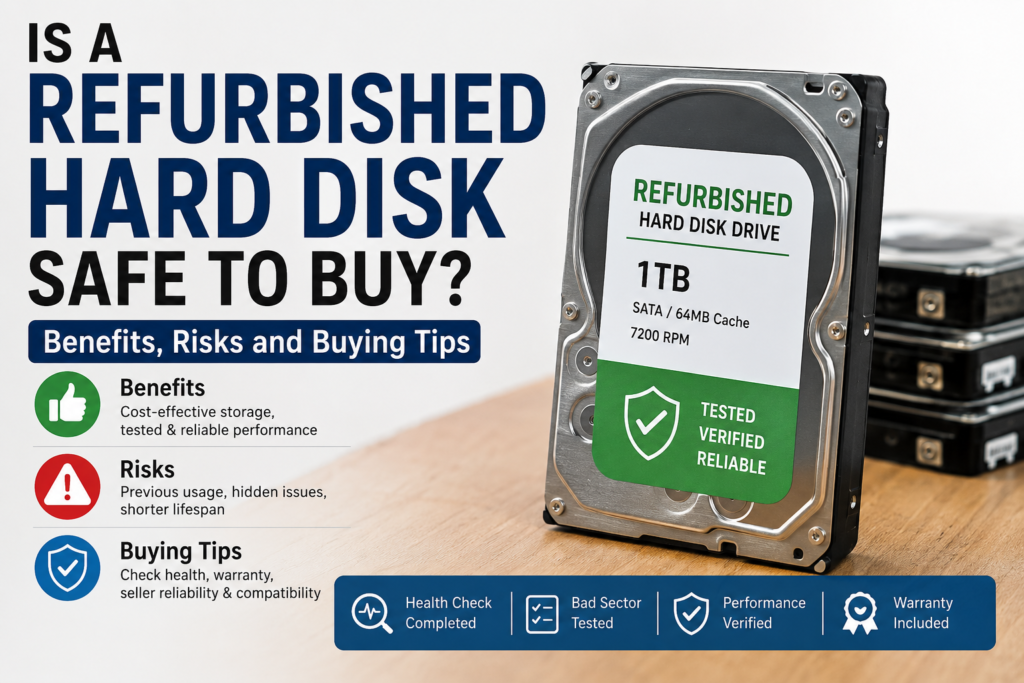
Buying a new hard disk is not always necessary, especially when you need affordable storage for a desktop computer, CCTV DVR, backup system or secondary storage. A refurbished hard disk can cost less than a new drive while still providing reliable performance when it has been properly tested and verified.
However, many buyers have an important question:
Is a refurbished hard disk safe to buy?
The short answer is: Yes, a professionally tested refurbished hard disk can be a safe and cost-effective option, provided you buy it from a reliable seller, check its health condition and choose a product with a clear warranty.
Not every used or refurbished hard drive offers the same quality. Some drives undergo detailed health checks, bad-sector testing and performance verification, while others may be sold without proper testing. Understanding the difference can help you make a better buying decision.
In this guide, we will explain what a refurbished hard disk is, its benefits and risks, how to check its condition and what you should consider before buying one.
What Is a Refurbished Hard Disk?
A refurbished hard disk is a previously used or returned storage drive that has been inspected, tested and prepared for reuse.
Depending on the seller and refurbishment process, the hard disk may undergo:
- Drive health testing
- Bad-sector scanning
- Surface scan verification
- Read and write performance testing
- SMART health analysis
- Secure removal of previous data
- Physical inspection
- Compatibility testing
A properly refurbished hard disk should be tested before it is offered for sale.
It is important to understand that the terms used hard disk and refurbished hard disk are not always the same.
A used hard disk may simply be removed from an old computer and sold again without detailed testing. A professionally refurbished hard disk should undergo health and performance checks before resale.
Is It Safe to Use a Refurbished Hard Disk?
A refurbished hard disk can be safe for many applications when it is properly tested and purchased from a trusted seller.
The reliability of the drive depends on several factors, including:
- Previous usage
- Total power-on hours
- Drive health
- Number of bad sectors
- Physical condition
- Read and write performance
- Quality of testing
- Warranty offered by the seller
A hard disk that passes complete health checks and has no major errors may continue to provide useful storage for a long time.
However, no storage device—new or refurbished—is completely protected from failure. Even a brand-new hard drive can develop a fault. Therefore, important files should never be stored on only one device.
Always maintain a backup of valuable business files, personal documents, photographs and CCTV footage.
Benefits of Buying a Refurbished Hard Disk
1. More Affordable Than a New Hard Drive
One of the biggest benefits of buying a refurbished hard disk is its lower cost.
A refurbished HDD can be useful for buyers who need additional storage without spending the full price of a new drive. It may be a practical choice for:
- Budget desktop upgrades
- Secondary computer storage
- CCTV DVR systems
- Testing computers
- Computer repair centres
- Office systems
- Temporary data storage
Prices of used and refurbished storage products can vary according to brand, capacity, condition, warranty and market availability. Buyers can also review storage listings and market information through the Nehru Place Market used hard disk page before comparing available options.
2. Suitable for Budget Computer Upgrades
If an older desktop computer has limited storage, installing a refurbished SATA hard disk can be an affordable way to increase its capacity.
For example, a desktop used for basic office work, billing software, document storage or general browsing may not always require an expensive new high-capacity drive.
A tested refurbished hard disk may provide enough storage while keeping the upgrade cost under control.
3. Useful for CCTV DVR Storage
CCTV systems continuously generate video recordings and require sufficient storage capacity.
A compatible refurbished surveillance hard disk may be used in selected DVR and NVR systems when the drive has been properly tested for stable operation.
For budget CCTV storage, you can explore the Refurbished Seagate 500GB CCTV DVR Hard Drive available from Harivision Tech. The drive is tested for health, bad sectors, surface condition and performance before dispatch.
For longer CCTV recording requirements, a higher-capacity surveillance drive may be more suitable. Harivision Tech also offers a Refurbished WD Purple 1TB Surveillance Hard Disk designed for compatible CCTV DVR and NVR systems.
4. Better Use of Existing IT Hardware
Refurbishing and reusing working storage devices can extend the useful life of IT hardware.
Instead of discarding every previously used hard drive, functional drives can be tested and reused where appropriate. This may help reduce unnecessary electronic waste and make computer hardware more affordable.
5. Warranty Can Reduce Buying Risk
A warranty is important when buying refurbished storage.
A seller warranty gives buyers a defined support period if the drive develops an eligible hardware problem. Before purchasing, check:
- Warranty duration
- Replacement conditions
- Return policy
- Physical-damage exclusions
- Testing process
Harivision Tech lists tested refurbished hard drives with seller warranty information on the respective product pages.
Risks of Buying a Refurbished Hard Disk
Although refurbished hard drives can offer good value, buyers should understand the possible risks.
1. The Drive Has Already Been Used
Unlike a new hard disk, a refurbished drive has usually completed some amount of previous operating time.
The remaining lifespan depends on its previous workload, operating temperature, power-on hours and overall health.
A drive used heavily in a server or continuous recording environment may have experienced more wear than a drive used occasionally in a home computer.
2. Poorly Tested Drives May Have Bad Sectors
Bad sectors are areas of a hard disk that may become difficult or impossible to read or write correctly.
A small number of reallocated sectors does not always mean immediate failure, but increasing bad-sector counts can indicate deterioration.
Before buying, ask whether the drive has undergone:
- Complete surface scanning
- Bad-sector testing
- SMART health checking
- Read and write testing
Avoid buying a hard disk if the seller cannot provide basic information about its condition or testing process.
3. Refurbished Drives May Have a Shorter Remaining Life
Because the drive has already been used, its remaining service life may be shorter than that of a comparable new hard disk.
However, age alone does not determine reliability. A well-maintained and lightly used drive may be in better condition than a newer drive that was exposed to excessive heat, vibration or heavy workloads.
4. Data Loss Is Still Possible
Every storage device can fail.
Do not use a single refurbished hard disk as the only location for irreplaceable data such as:
- Business records
- Customer information
- Financial documents
- Family photographs
- Important project files
- Critical CCTV evidence
Maintain at least one additional backup on another storage device or a trusted cloud platform.
5. Some Sellers May Use “Refurbished” as a Marketing Term
Not every seller follows the same refurbishment process.
Some products may be advertised as refurbished even when they have only been cleaned or formatted. Formatting a drive does not confirm its physical health.
A reliable seller should clearly mention:
- Product condition
- Testing process
- Storage capacity
- Interface type
- Form factor
- Compatibility
- Warranty details
How to Check a Refurbished Hard Disk Before Buying
Check SMART Health Status
SMART stands for Self-Monitoring, Analysis and Reporting Technology.
SMART data can provide information about the internal condition of a hard drive. Depending on the software used, you may be able to check:
- Overall health status
- Power-on hours
- Reallocated sectors
- Pending sectors
- Uncorrectable sectors
- Drive temperature
- Read errors
A healthy status is useful, but SMART information should not be treated as a guarantee that the drive will never fail.
Check for Bad Sectors
Ask whether the hard disk has completed a full bad-sector or surface scan.
A quick format is not the same as a complete surface test. A detailed scan checks the drive more thoroughly and may identify weak or unreadable areas.
Verify the Correct Storage Capacity
Connect the hard disk to a compatible computer and confirm that the detected capacity is close to the advertised storage size.
The usable capacity displayed by the operating system may be slightly lower than the marketed capacity because manufacturers and operating systems calculate storage differently.
Test Read and Write Performance
Very slow transfer speeds, unusual delays or repeated read errors may indicate a problem.
Performance can vary depending on:
- HDD model
- Rotation speed
- SATA interface
- Computer hardware
- File size
- Drive condition
The purpose of testing is not only to measure speed but also to check whether the drive performs consistently without errors.
Listen for Unusual Sounds
Mechanical hard drives normally produce some operating sound. However, repeated clicking, grinding or unusual mechanical noises may indicate a possible hardware issue.
If a drive makes abnormal sounds, stop using it for important data and request technical support.
Check the Warranty
A warranty is one of the most important factors when purchasing refurbished hardware.
Before placing an order, confirm:
- How long the warranty lasts
- Whether replacement support is available
- Which faults are covered
- Whether physical damage is excluded
Do not choose a drive only because it has the lowest price. Testing quality and warranty support may provide better long-term value.
Refurbished Hard Disk vs New Hard Disk
| Feature | Refurbished Hard Disk | New Hard Disk |
|---|---|---|
| Price | Usually more affordable | Usually more expensive |
| Previous usage | Previously used or returned | Generally unused |
| Testing | Depends on the seller | Manufacturer quality testing |
| Warranty | Usually seller warranty | Usually manufacturer warranty |
| Expected lifespan | Depends on previous use and health | Typically has a longer unused service life |
| Best suited for | Budget upgrades, secondary storage and selected CCTV applications | Primary storage and critical long-term use |
The right choice depends on your budget and intended use.
If you need storage for critical business data and want a longer manufacturer-backed warranty, a new hard disk may be preferable.
If you need affordable storage for a budget computer, secondary drive or compatible CCTV DVR, a tested refurbished hard disk with a clear warranty may offer better value.
Is a Refurbished Hard Disk Good for CCTV?
A refurbished hard disk can be used for CCTV when:
- It is compatible with the DVR or NVR
- It has passed health and bad-sector tests
- It provides sufficient storage capacity
- It is suitable for the expected recording workload
- The seller provides clear warranty support
Storage requirements depend on the number of cameras, video resolution, frame rate, compression format and recording schedule.
For a smaller CCTV installation, a 500GB drive may provide budget-friendly storage. Larger systems or longer recording-retention requirements may need 1TB, 2TB or higher capacity.
For CCTV-focused storage options, explore the Harivision Tech Hard Disk Collection.
Is a Refurbished Hard Disk Good for Gaming?
A refurbished hard disk can be used for storing large game files if it is healthy and compatible with the computer.
However, an SSD generally provides:
- Faster game loading
- Faster application startup
- Better system responsiveness
- Quicker file access
For a budget gaming computer, an SSD can be used for the operating system and frequently played games, while a tested hard disk can be used for additional storage.
Is a Refurbished HDD Suitable as a Primary Drive?
A healthy refurbished HDD may work as a primary storage drive, but an SSD is generally a better choice for the operating system because it provides faster startup and application performance.
A practical budget setup can include:
- SSD for Windows and applications
- Refurbished HDD for files and additional storage
Harivision Tech also provides tested refurbished RAM and NVMe storage options for compatible laptops and desktop computers. You can explore the Refurbished RAM and NVMe Collection for available upgrade products.
Important Buying Tips for Refurbished Hard Disks
Before buying a refurbished HDD, follow these tips:
- Buy from a seller that clearly mentions the product condition.
- Check whether the drive has undergone health and bad-sector testing.
- Choose the correct form factor: 2.5-inch or 3.5-inch.
- Confirm SATA compatibility with your computer, DVR or NVR.
- Select enough storage capacity for your requirements.
- Check the warranty and replacement terms.
- Compare value, not only the lowest price.
- Avoid storing important data without a backup.
- Check the drive after delivery.
- Contact the seller if you notice unusual sounds, errors or unstable performance.
Why Buy a Refurbished Hard Disk from Harivision Tech?
Harivision Tech provides tested refurbished IT hardware and storage products for individuals, computer professionals and business buyers.
Depending on the product, quality checks may include:
- Complete drive health checking
- Bad-sector testing
- Surface scan verification
- Read and write performance testing
- Secure data wiping
- Compatibility verification
Product specifications, condition and warranty information are mentioned on the relevant product pages so buyers can review the details before ordering.
You can explore available products through the Harivision Tech online store.
Frequently Asked Questions
Is it worth buying a refurbished hard disk?
Yes, a tested refurbished hard disk can provide good value for budget computer upgrades, secondary storage and selected CCTV applications. Check its health, warranty and compatibility before buying.
How long can a refurbished hard disk last?
There is no fixed lifespan. It depends on the drive’s age, previous usage, operating temperature, health condition and workload.
Can I store important files on a refurbished hard disk?
You can store files on a healthy drive, but important data should always have an additional backup. This recommendation applies to both new and refurbished storage devices.
Is a refurbished hard disk the same as a used hard disk?
Not necessarily. A used hard disk may be resold without detailed testing, while a properly refurbished drive should be inspected and tested before resale.
Can I use a refurbished hard disk in a CCTV DVR?
Yes, if the drive is compatible with the DVR and has been tested for stable operation. Check the required storage capacity and warranty before purchasing.
Should I buy an HDD or SSD?
Choose an SSD when speed is the priority. Choose an HDD when you need more storage at a lower cost. Many users combine an SSD for the operating system with an HDD for additional storage.
Final Verdict: Is a Refurbished Hard Disk Safe?
A refurbished hard disk can be a safe and economical purchase when it is professionally tested, has acceptable health status and includes a clear seller warranty.
The key is not to buy only based on the lowest price. Check the testing process, bad-sector status, compatibility, warranty and seller reliability.
For budget desktop storage, secondary storage and compatible CCTV applications, a quality-tested refurbished HDD can provide useful performance at a lower cost than many new storage options.
Explore tested storage products at Harivision Tech and choose the capacity that matches your computer or CCTV requirements.