
Best HP Laptop Chargers with Blue Pin and Smart Pin Explained – Complete Buying Guide
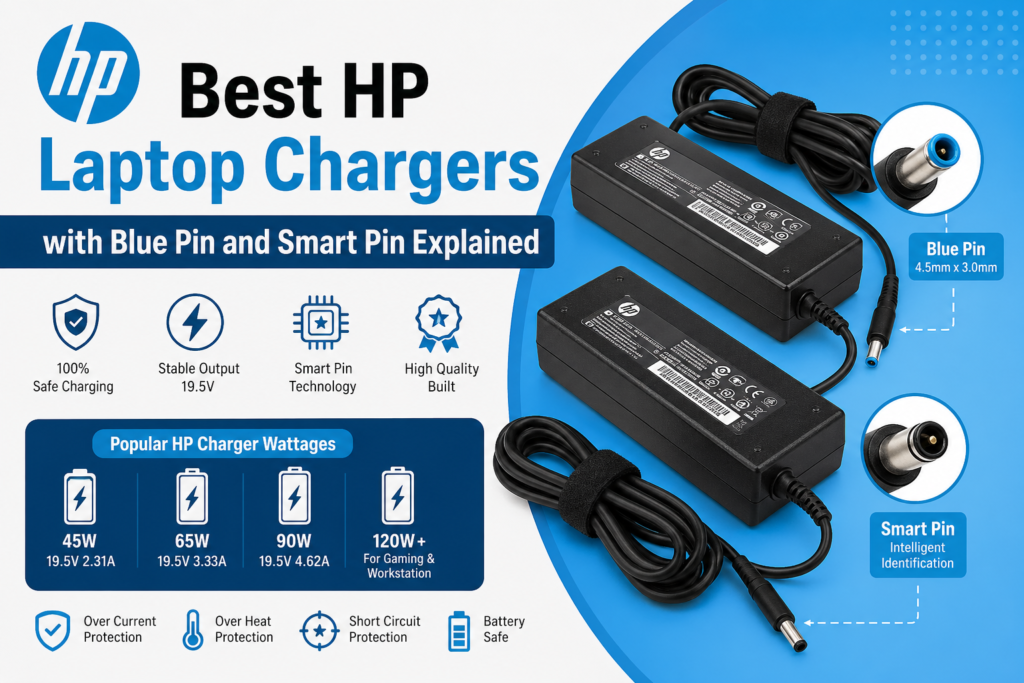
If your HP laptop charger has stopped working, charges slowly, or you are confused about which replacement adapter to buy, then understanding the difference between HP Blue Pin Charger and HP Smart Pin Charger becomes very important.
Many HP laptop users make the mistake of purchasing the wrong charger simply because all HP adapters look almost the same. But in reality, HP uses special charging technology where connector size, center smart pin, voltage, and wattage all matter for proper charging and laptop safety. HP notes that common barrel HP adapters include the 4.5mm blue smart pin and 7.4mm smart pin, and the charger must match the laptop’s required voltage while meeting or exceeding wattage.
In this complete guide, we will explain:
- What is HP Blue Pin charger?
- What is HP Smart Pin technology?
- Which HP charger is best for your laptop?
- Can all HP chargers work on every HP laptop?
- How to choose the right HP charger online?
So before buying any replacement HP adapter, read this full article.
For all compatible models, you can also check our latest collection here:
👉 https://harivisiontech.in/product-category/laptop-charger/
What is an HP Blue Pin Laptop Charger?
The HP Blue Pin Charger is one of the most commonly used HP laptop charging adapters found in Pavilion, ProBook, EliteBook, Envy and many business series laptops.
It is called blue pin because:
- the charger connector has a blue inner ring
- with a small center identification pin
- connector size usually 4.5mm x 3.0mm
HP identifies this as its standard 4.5mm Smart connector, widely used across business and consumer laptops.
This small center pin is not just for holding power.
It actually performs communication between charger and laptop.
That is why HP blue tip chargers are often called:
HP Smart Pin Chargers
What is HP Smart Pin Charger Technology?
Unlike ordinary local laptop chargers, HP smart chargers have an additional center sensing pin inside the round connector.
This smart pin tells the laptop:
- whether the charger is original or compatible
- how much wattage the charger can deliver
- whether charging is safe for battery
- whether laptop can run full performance mode
HP’s own documentation explains that the “Smart” in Smart AC adapters refers to intelligent communication between the charger and the laptop, allowing the system to recognize adapter capability and adjust safely.
Community users also report that non-smart-pin third-party chargers may power on the laptop but can trigger “incompatible adapter” warnings, slow charging, or reduced performance.
Why Smart Pin Matters?
If the smart pin is missing or damaged:
- laptop may show plugged in not charging
- battery charges very slowly
- charging notification error can appear
- performance throttling happens
- motherboard charging IC can become unstable
This is why local cheap chargers often fail on HP laptops.
Difference Between HP Blue Pin and HP Smart Pin Charger
Actually many users think both are different chargers.
But truth is:
HP Blue Pin = Physical Connector Design
HP Smart Pin = Internal Identification Technology
That means:
- Blue pin refers to the blue 4.5mm tip connector.
- Smart pin refers to the sensing center communication pin inside it.
So most HP blue pin chargers are smart pin chargers.
Some older HP laptops also use:
HP Big Pin Smart Charger (7.4mm x 5.0mm)
This is a larger round connector generally used in:
- older HP ProBook
- workstation laptops
- gaming laptops
- high watt models
HP lists this larger 7.4mm smart connector as common on workstation and gaming systems that need higher wattage adapters.
Best HP Laptop Charger Wattages Available
Choosing only pin size is not enough.
You also need correct power rating.
Most HP laptop chargers come in:
1. HP 45W Blue Pin Charger
Best for:
- compact notebooks
- entry Pavilion models
- small office laptops
Output:
19.5V 2.31A
2. HP 65W Blue Pin Smart Charger
Best for:
- Pavilion
- ProBook
- EliteBook
- Envy
Output:
19.5V 3.33A
This is the most selling HP charger.
3. HP 90W Smart Pin Charger
Best for:
- performance office laptops
- business heavy usage systems
Output:
19.5V 4.62A
4. HP 120W / 150W / 200W Chargers
Best for:
- gaming laptops
- HP Omen
- ZBook workstations
HP’s charger guide notes that mainstream ultrabooks commonly use 45W–65W, business/performance models use 65W–90W, while gaming/workstation systems may require 120W to 230W or more.
How to Check Which HP Charger Your Laptop Needs?
Before buying:
Check these 4 things:
✅ Voltage must match exactly
Usually:
19V or 19.5V
✅ Ampere can be same or higher
✅ Wattage should be equal or higher
✅ Connector must be exact blue smart pin size
This same guidance is echoed by HP users and repair communities: voltage should match, wattage should meet or exceed the original adapter, and connector/smart pin compatibility is essential.
You can simply check the old charger label.
Example:
OUTPUT: 19.5V — 3.33A = 65W
Why Cheap Local HP Chargers Often Fail?
Most local chargers available in market have:
- no real smart pin signal
- unstable voltage
- low copper wire
- duplicate IC
- heating issue
- loose blue pin connector
As a result:
- laptop charges on/off
- battery health reduces
- charging jack becomes loose
- motherboard power section gets affected
Reddit HP users repeatedly mention that unofficial chargers without proper smart pin implementation can cause recognition issues, slow charging, or unstable performance.
Original Compatible High Quality Smart Pin HP Charger
Buy Best HP Blue Pin Smart Pin Chargers Online in India
If you are looking for tested and warranty-backed HP laptop chargers, we provide:
- HP Blue Pin 45W Charger
- HP Blue Pin 65W Charger
- HP Smart Pin 90W Charger
- HP Big Pin Chargers
- USB Type HP Chargers
✔ High quality imported adapters
✔ Smart pin compatible IC
✔ Stable output power
✔ Seller warranty available
✔ Safe for battery and motherboard
👉 Browse HP Laptop Chargers Here:
https://harivisiontech.in/product-category/laptop-charger/
Final Words
Buying the correct HP laptop charger is not just about fitting the pin.
You need:
- correct blue tip size
- working smart pin
- right wattage
- stable 19.5V output
- quality internal components
Because HP laptops are highly sensitive to adapter identification, using the wrong charger can create charging problems, battery issues, or low performance warnings.
So whether you need a HP Blue Pin Charger or a HP Smart Pin Adapter, always choose a reliable replacement that supports proper HP charging communication.
✅ FAQ SECTION (SEO BOOSTER)
Q1. Is HP Blue Pin charger and Smart Pin charger same?
Yes, in most modern HP laptops blue pin chargers include smart pin identification technology.
Q2. Can I use 90W HP charger instead of 65W?
Yes, if voltage and connector are same. Higher wattage charger is generally safe because laptop draws only required power. HP also confirms Smart adapters can safely power lower-wattage systems when specs match.
Q3. Why does my HP laptop show plugged in not charging?
This usually happens because of damaged smart pin, wrong charger wattage, loose charging jack, or low quality duplicate adapter.
Q4. What is HP Blue Pin charger size?
Mostly 4.5mm x 3.0mm with center smart sensing pin.
Q5. Is local HP charger safe?
Cheap local chargers are risky. Always use original compatible smart pin charger with stable output.